The margin that wasn't there
You penciled in 30%. You forgot FBT, returns and the withdrawal fee. It was 4% — and you found out 300 units later.
Full unit economics with FBT fees, product research and a list of creators already selling it — right on the TikTok Shop product page. No tabs, no spreadsheets.
Early access and a price locked for life — first 100 users.
So we invite you to the right wave
Where are you right now?
Last question
Monthly revenue — so we know what scale to build for.
You're on the list. The welcome email is on its way — hit reply with one line: what annoys you most right now. I read every answer.
You penciled in 30%. You forgot FBT, returns and the withdrawal fee. It was 4% — and you found out 300 units later.
200 creator invites, 6 replies, 0 videos. The list was guesswork instead of people who already moved a product like yours.
Calculator, Alibaba, FastMoss, Google Sheets, Seller Center. Fifteen minutes per product. A week for a hundred.
You pay for an analytics platform and still make the buy-or-skip call by gut feel.
Referral, affiliate, ad spend, withdrawal fee, prep center, returns and the refund admin fee. Plus full fulfillment math from dimensions and weight — chargeable weight, weight tier, shipping opt-out and the SIOC discount.
The gap is 14×. That's how "profitable" products end in a cash crunch. These numbers follow the sliders in the calculator above — try your own product.
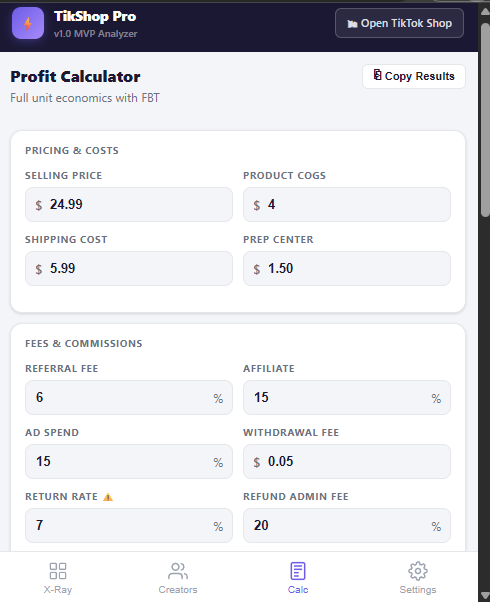
assets/img/calc-inputs.png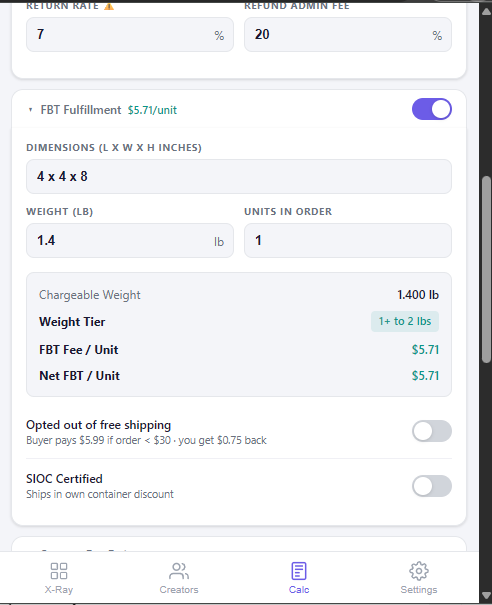
assets/img/calc-fbt.png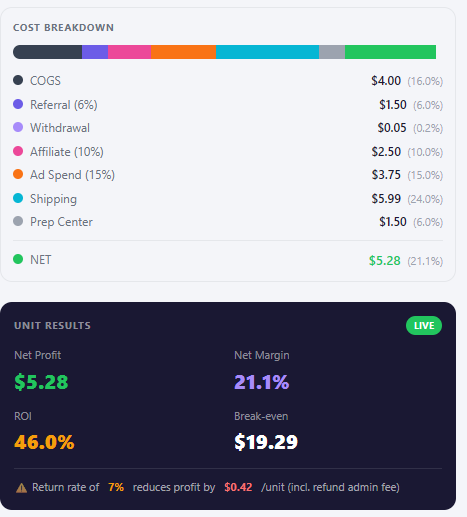
assets/img/calc-result.pngYou stop hunting for creators. You take the proven ones from the seller who already paid to find them.
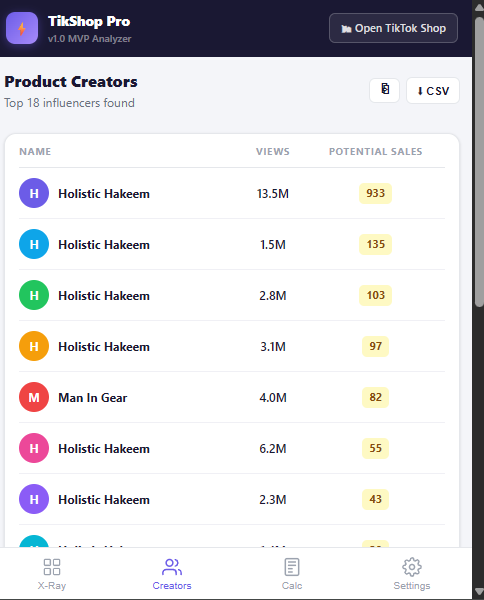
assets/img/creators.pngAny TikTok Shop listing. The overlay opens on its own.
15 secondsEveryone who filmed this product, with their metrics.
1 clickBy views and estimated sales — only the ones who convert stay.
30 secondsThe CSV goes straight into collaboration invites.
List readyPrice, sales, rating, creator count and revenue per creator. Plus a score where every point is visible.
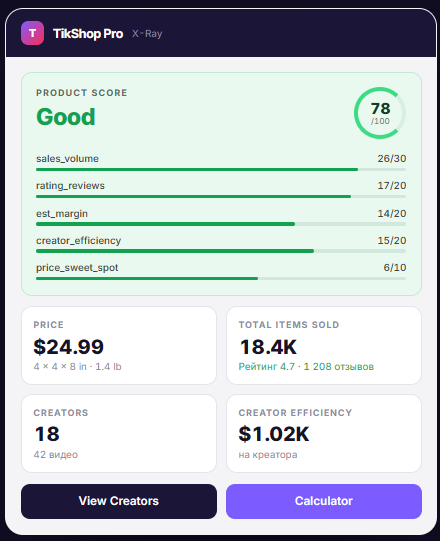
assets/img/xray.pngWhen a factor can't be read, it's dropped from the score instead of counted as zero. The weights redistribute and the panel says plainly how many factors the score is based on.
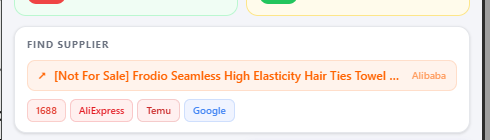
assets/img/supplier.pngThe product title gets stripped of marketing noise — emoji, "viral", "best seller", the year — and goes out as a clean search query to Alibaba, 1688, AliExpress or Temu. No copy-paste, no manual cleanup.
One click from the Chrome Web Store. No signup needed for your first analyses.
The overlay appears on its own, metrics and score load right away.
Run the profit math, export creators, find a supplier — without leaving the page.
Demo: from a product page to the profit math — 35 seconds, uncut.
TikShop Pro doesn't replace analytics platforms. It covers what they don't: the decision on one specific product, at the moment you're looking at it.
| What a seller needs | TikShop Pro | FastMoss | Google Sheets |
|---|---|---|---|
| Works on the product page | Yes | — | — |
| Unit economics with FBT | Yes | — | manual |
| Returns and refund admin fee | Yes | — | manual |
| Creator export per product | In the overlay | Yes | — |
| Transparent score with a breakdown | Yes | — | — |
| Supplier search | Yes | — | — |
| Free plan | 7 days | some do | Yes |
Based on publicly stated features at the time of publishing: the FastMoss column also stands in for Kalodata and EchoTik — same set of gaps. Re-check before you spend on ads — competitor feature sets move.
Next is a full store control panel: margin and profit per SKU, sales analytics and automation for the daily grind. You decide the order — answer the two questions on the right.
X-Ray, FBT calculator, creator export, supplier search.
Real profit and margin per SKU, sales analytics, reports without spreadsheet exports.
Whatever you're still doing by hand in Seller Center every day. What exactly — the poll on the right decides.
Pick what gets in the way most in TikTok Shop — it directly shapes the build order.
Vote counted. Thanks — this genuinely moves the priorities.
Founding is a one-time payment, not a subscription: the extension and all its updates are yours. The 100 product-analysis monthly limit is enough for real research and keeps access from being resold. Once we connect full sales data, new users will see a $14/mo subscription — it won't apply to founding access.
TikShop Pro comes from an agency that runs TikTok Shop stores and an active seller with a working store and real revenue. Every formula in the calculator grew out of our own reports and our own mistakes: FBT we didn't account for, returns, blind creator invites, an evening spent rebuilding a spreadsheet. We build the tool we use ourselves every day — and fix what annoys us in it.
The extension reads public data from product pages, the same way your browser does. It never signs into your Seller Center, never acts on your behalf and never asks for seller account access.
From public information on the TikTok Shop product page. Some metrics are estimates and the interface says so. We don't pass an estimate off as a hard number.
It follows the TikTok Shop Fulfillment rate card by weight tier and dimensions, including chargeable weight. Every rate is editable if your terms differ.
TikTok Shop US only for now. Other regions are planned: fees and rules differ there, and we won't ship an approximation.
Not for the 7-day trial. Yes for saving your rates and exporting CSV.
Founding access is a one-time payment: it never turns into a subscription. A subscription will show up later, for new users only — your access to the extension and its updates stays paid for.
No dates promised. The dashboard runs on the TikTok Shop partner API, which is its own build and approval cycle. Feature order is decided by the Roadmap vote above.
Early access, a locked price, and a say in what gets built next.
No spam. Launch and major updates only.
Early access opens in waves. The email with details arrives within five minutes.
So we invite you to the right wave
Where are you right now?
Last question
Monthly revenue — so we know what scale to build for.
You're on the list. The welcome email is on its way — hit reply with one line: what annoys you most right now. I read every answer.